AI Storyboards & Character Sheets
Grasp each episode in one sheet before you read thousands of words—storyboards plus character sheets for your cast. Decide fast with Premium AI visuals.
Script done—but should you commit to cut generation yet? Most directors pause before reading every line. Directors Console AI storyboards and character sheets visualize each episode as one sheet—boards for flow, cast sheets for who looks like what—so you see first, decide fast—before the long read.
🖼️ AI Storyboards & Character Sheets (Premium / Studio)
Google Gemini image generation (Nano Banana) builds storyboard sheets or character reference sheets from your script—panels per scene, or cast in a row. One sheet = 10 AI credits. Each episode is delimited by script fences (`-----`).
Why you don’t have to read every word first
AI scripts grow long fast. Reading everything before you commit is heavy work before creation even starts. Storyboards and character sheets remove that bottleneck. A few seconds on one episode sheet conveys tone, staging, cast looks, and where the climax is heading. Text for detail, boards and character sheets for decisions—that's the design.
Instant go / no-go
Skip reading thousands of words of AI script on day one. One storyboard or character sheet per episode shows tone, drama, cast looks, and whether the project is worth pursuing—so your time goes to the decision, not the scroll.
See blocking and story flow
Each sheet packs multiple panels—scene turns, blocking, and cut rhythm at a glance. What “kind of film” this becomes stops being abstract and starts looking like a movie.
Complements cut generation
Bulk cut generation handles technical prompts for Veo and Sora—lens, camera, dialogue. Storyboards and character sheets sit upstream: share the vision and read the story episode by episode. Together they accelerate production.
Compare versions
Up to 2 images per episode on Premium, 5 on Studio. Swap boards or character sheets after a rewrite and compare before and after. Thumbnail badges show how many you have.
Read-through in Reader mode
In Reader mode, boards and character sheets appear inline after each episode fence—script and visuals alternating like a pre-release preview of the whole arc.
Film strip on mobile
A film strip above the script scrolls EP1, EP2, and more. Tap for fullscreen; rotate for landscape detail—share the vision on the go.
Character sheets (new)
Generate a horizontal reference sheet of characters in the episode. In cinematic or live-action styles, share “who looks like what” before storyboards.
One episode = one storyboard sheet
Output resembles a real production board: scene titles, action lines, and dialogue captions in panels—one episode on one sheet. Lightweight 1K WebP prioritizes overview over fine print, so thumbnails and fullscreen both stay snappy.
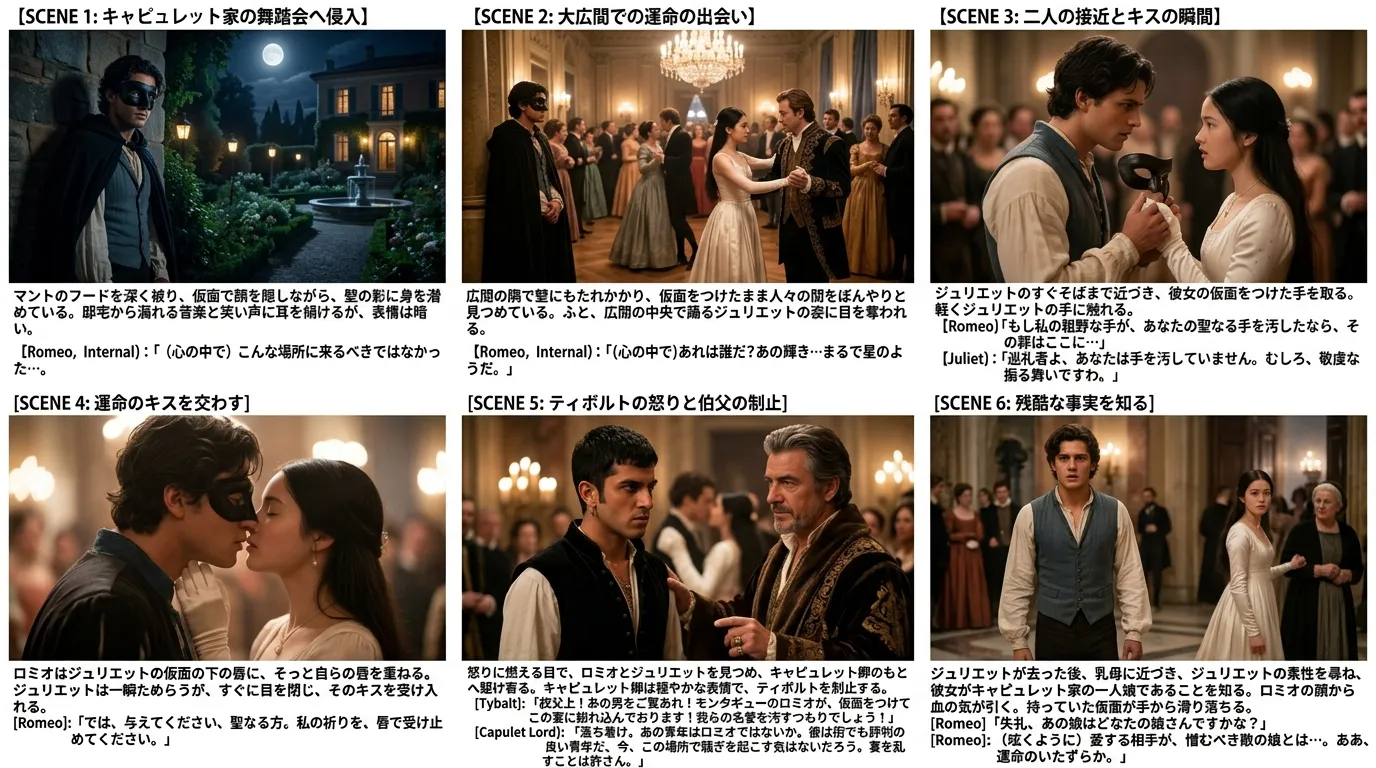
Four visual styles to compare
In the “+ Gen” panel, switch styles for the same episode. Color (Anime) and Sketch suit rough sharing; Cinematic and Live-action help judge whether the look matches your finished film. At 10 credits each, generating two or three styles and comparing in preview works well.
Color (Anime)
Manga-inspired tone
Sketch
Pencil rough
Cinematic
Film lighting & texture
Live-action
Photorealistic
👤 Character sheets (new)
NEW — “Character sheet” output type
Besides storyboards, generate a horizontal reference sheet of characters who appear in the episode. The AI pulls cast details from your character block and scene headings into one row.
Instead of re-reading long appearance notes, share who looks like what on one sheet—especially in Cinematic or Live-action styles for stakeholders or before storyboards. Generating a character sheet first often improves consistency in later boards.
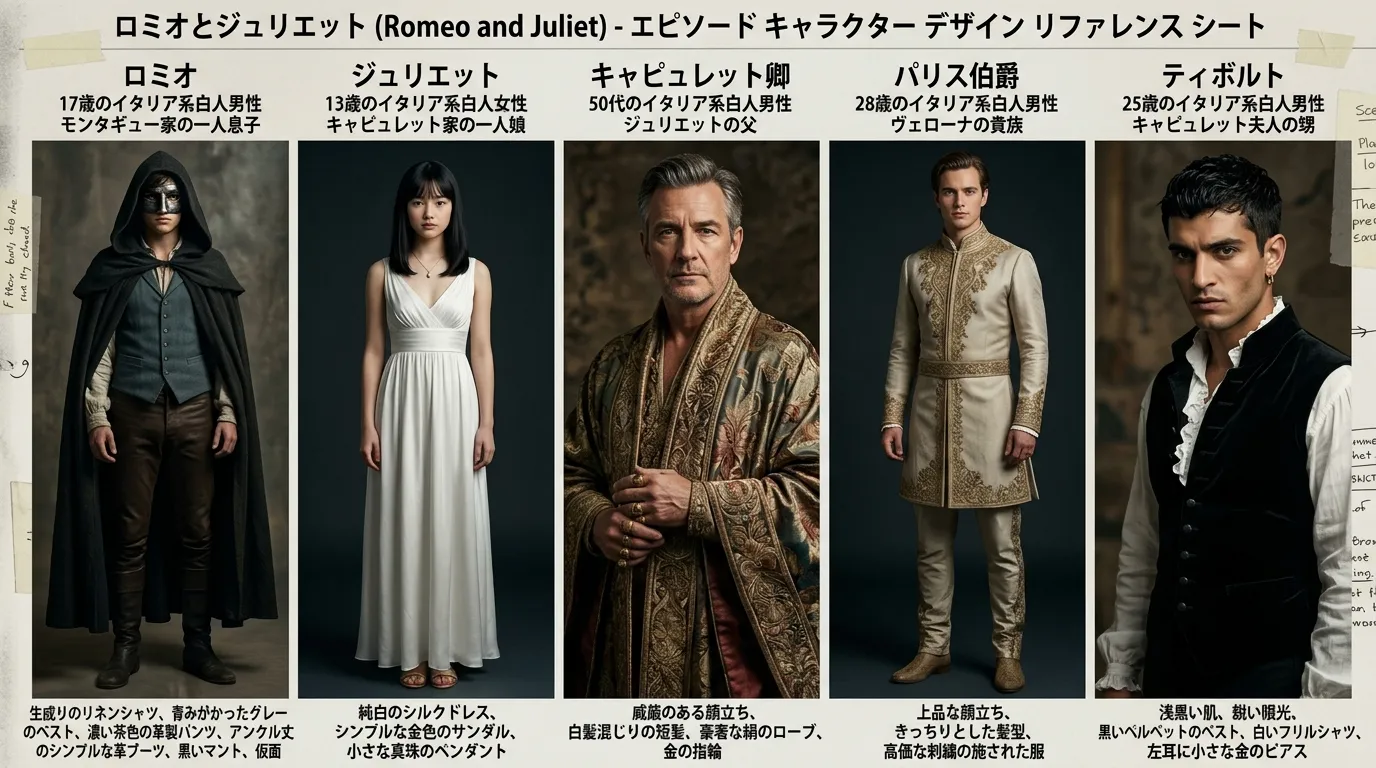
- Film strip “+ Gen” → choose “Character sheet” as output type
- Pick a style (e.g. Cinematic or Live-action) and generate (10 credits)
- Preview → save adds to the same episode slot (Premium 2 / Studio 5 images)
Three places you’ll use it
- Film strip: Above the script—EP thumbnails and “+ Gen”. Pick output type (storyboard / character sheet) and style.
- Fullscreen viewer: Move across episodes and versions. On desktop, controls sit outside the art; on mobile, in the bottom bar—never blocking the board.
- Reader mode: 📖 Reader inserts boards and character sheets after each fence (default ON). Toggle with “Boards & chars ON/OFF”. Best for a read-through before you commit.
Then: cut generation
Once boards or character sheets say “yes, shoot this,” proceed with 🚀 bulk or 🎬 single cut generation as usual. Sticky notes carry lens, camera, and dialogue for video AI. Entering cuts with the big picture already clear cuts rework and hesitation.
Why Premium / Studio
Storyboards and character sheets use costly image APIs (10 credits per sheet). In return they compress hours—long reads, stakeholder pitches, your own doubt—into one visual. Premium and Studio add monthly credits so script → boards & character sheets → cuts stays affordable end to end.